Apple has made significant updates to CarPlay, focusing on improving security and privacy for users. Key changes include:
R18.1 Update (April 2025): Fixed two critical security vulnerabilities (CVE-2025-31200 and CVE-2025-31201) that allowed remote code execution and bypassing pointer authentication. It also resolved wireless connectivity issues with certain vehicles.
iOS 26 Updates (2026): Addressed 37 security vulnerabilities, introduced Stolen Device Protection (enabled by default), and added end-to-end encryption for RCS messaging. Other features included a compact call interface and improved system stability.
These updates aim to protect personal data, prevent device theft, and enhance overall user safety. However, delays in automaker integration of these patches highlight the need for proactive steps, like ensuring your system runs the latest software. Professional installation services can also help maximize security and functionality for CarPlay systems.
iOS 26.2 CarPlay Just Dropped – You NEED To Do This!
The R18.1 update (iOS 18.4.1, ~350 MB, April 2025) addressed two zero-day vulnerabilities that were being actively exploited in targeted attacks. This is part of Apple’s ongoing efforts to strengthen device security.
Security Vulnerabilities Fixed
This update resolved two major vulnerabilities. The first, CVE-2025-31200, involved a memory corruption issue in CoreAudio. An attacker could exploit this by using a malicious audio file or stream, potentially leading to arbitrary code execution on the device. The second vulnerability, CVE-2025-31201, allowed attackers with read and write access to bypass Apple’s Pointer Authentication feature, compromising device security.
Vulnerability
CVE ID
Issue Description
Fix
CoreAudio
CVE-2025-31200
Exploited via malicious audio files for code execution
Improved bounds checking
RPAC
CVE-2025-31201
Bypassed Pointer Authentication protections
Removed vulnerable code
Stability Improvements
Beyond security fixes, the update also tackled connectivity issues. It resolved a regression in iOS 18.4 that disrupted wireless CarPlay connections in certain vehicles, particularly affecting BMW and Hyundai users. Apple’s release notes mentioned:
This update provides important bug fixes, security updates, and addresses a rare issue that prevents wireless CarPlay connection in certain vehicles.
Additionally, users reported better overall performance, including snappier animations and smoother functionality, especially noticeable on older models like the iPhone 13.
Installation Options
To install the update, navigate to Settings > General > Software Update on your iPhone (XS or later). Ensure your device has at least a 50% charge or is connected to a power source. If wireless CarPlay issues persist after updating, try turning Bluetooth off and back on or re-pairing your iPhone with your vehicle.
2. Apple CarPlay iOS 26 Updates (2026)
In 2026, Apple doubled down on CarPlay improvements with the iOS 26 update cycle, focusing heavily on security and privacy. After shelving "Project Titan" – Apple’s ambitious electric car project – in 2024, the company shifted gears to prioritize CarPlay enhancements. This renewed effort addressed long-standing issues and introduced critical updates.
Security Vulnerabilities Fixed
The iOS 26.3 release tackled 37 security vulnerabilities across the system. Among the most concerning was a flaw in the dyld dynamic link editor (CVE-2026-20700). This vulnerability allowed attackers with memory write access to execute arbitrary code and had already been exploited in sophisticated, targeted attacks on older iOS versions. Ryan Christoffel from 9to5Mac highlighted the importance of these fixes, noting the extensive effort to patch over 35 vulnerabilities in this release.
Another key fix addressed a Bluetooth vulnerability (CVE-2026-20650) that could disrupt wireless CarPlay functionality through denial-of-service attacks using crafted packets. Apple also improved memory handling across various components, including Kernel, CoreMedia, and WebKit, to prevent crashes and bolster stability. For users of older devices, Apple rolled out iOS 18.7.5 with equivalent security updates.
Privacy Enhancements
iOS 26 introduced several privacy-focused updates specifically for CarPlay users:
A new setting allows drivers to control whether screenshots can be captured within the CarPlay interface, giving them more control over visual data.
Incoming calls now appear in a compact view, ensuring navigation data remains visible while reducing distractions and safeguarding privacy.
Additionally, iOS 26.4 expanded security for messaging by implementing end-to-end encryption (E2EE) for RCS messages. This ensures that messages between iPhones and non-Apple devices are only readable by the sender and recipient. Security expert Arin Waichulis explained:
While this [transport-layer encryption] protects against basic interception during transmission, it doesn’t guarantee that messages cannot still be accessible server-side, unlike E2EE, where only the sender and recipient can read the content.
Another notable addition was the activation of Stolen Device Protection by default. This feature requires Face ID or Touch ID for any sensitive changes, eliminating the passcode fallback. It also enforces a one-hour delay for security settings when the device is away from familiar locations.
Installation Options
Users can install iOS 26 updates through the usual process (Settings > General > Software Update) on iPhone 11 and newer models. However, some features – like "Video in the Car" (AirPlay video) and the Apple TV app for CarPlay – require automakers to implement support. Joe Rossignol from MacRumors noted:
Automakers will need to implement support for the CarPlay video functionality, due to the safety requirement that the vehicle be parked, so it may take some time for the feature to widely roll out.
These updates reflect Apple’s ongoing commitment to making CarPlay more secure, user-friendly, and adaptable to modern needs.
Pros and Cons
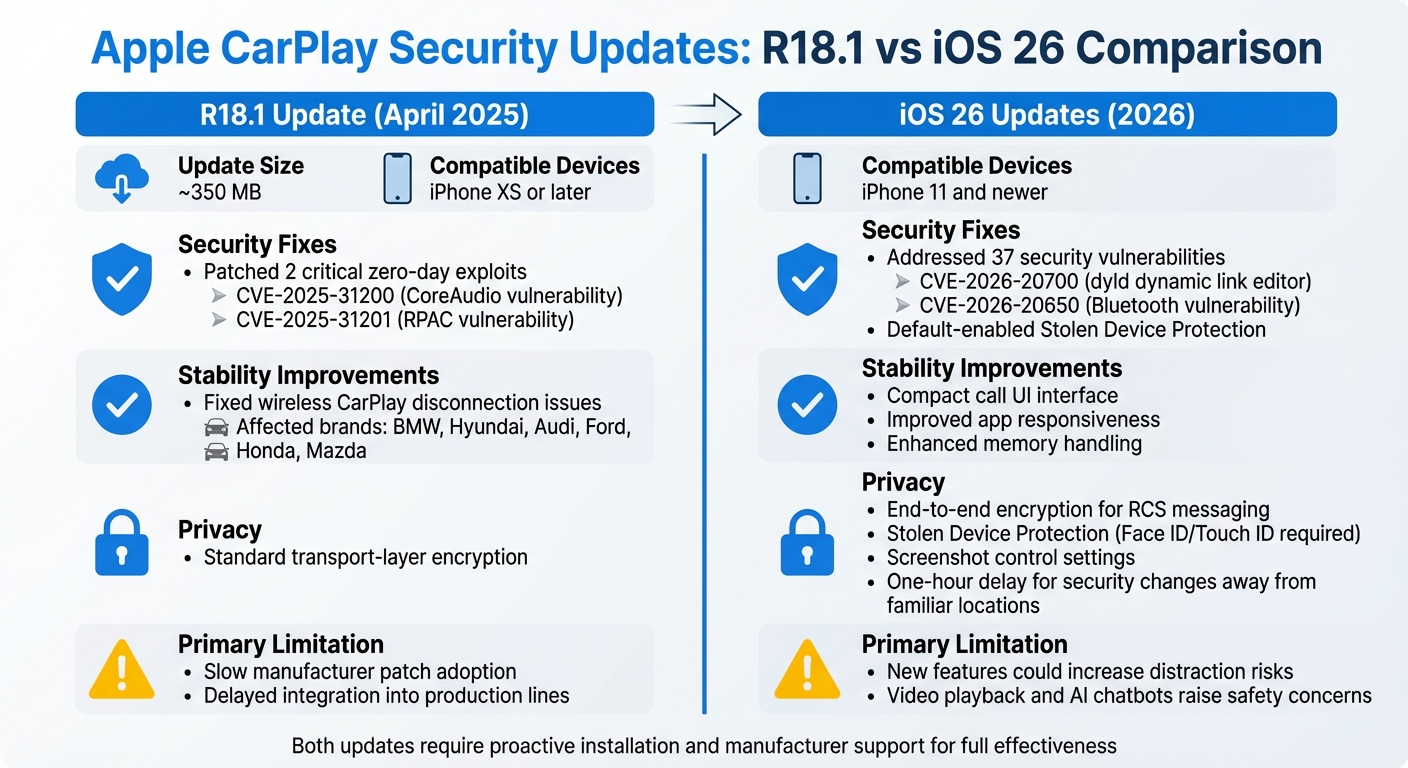
Apple CarPlay R18.1 vs iOS 26 Security Updates Comparison
The April 2025 R18.1 update and the 2026 iOS 26 release both aimed to improve security, but each came with its own set of trade-offs. These updates tackled vulnerabilities and introduced new features, but not without some challenges.
The R18.1 update addressed two critical zero-day vulnerabilities – CoreAudio (CVE-2025-31200) and RPAC (CVE-2025-31201). These flaws previously allowed attackers to remotely execute code through malicious media files. Additionally, it fixed wireless CarPlay disconnection issues that had plagued vehicles from brands like BMW, Hyundai, Audi, Ford, Honda, and Mazda. However, a major downside was the sluggish adoption of these patches by manufacturers. As Cybersecurity News pointed out:
Unlike smartphones, which receive frequent over-the-air (OTA) updates, vehicle software update cycles are notoriously slow and fragmented.
Even months after the update, many automakers had not integrated the patches into their production lines.
The iOS 26 updates, on the other hand, introduced default-enabled Stolen Device Protection and added end-to-end encryption for RCS messaging, significantly boosting user privacy. Security expert Arin Waichulis highlighted:
Stolen Device Protection completely thwarts this vulnerability… requires Face ID or Touch ID authentication (with no passcode fallback) before users can change important security settings.
The update also brought features like a compact call interface and pinned conversation controls, which aimed to minimize driver distractions. However, some additions – like Smart Display Zoom, third-party AI chatbots, and video playback (usable when parked) – raised concerns about increased distraction risks.
Both updates made strides in addressing security concerns, but their effectiveness depends on how users and manufacturers handle the changes.
Auto Sound & Security’s Installation Services
When it comes to getting the most out of recent CarPlay security updates, proper installation is key. These updates have focused on addressing vulnerabilities, and expert installation ensures that your system remains secure and fully functional. At Auto Sound & Security, skilled technicians handle the intricate integration process, safeguarding your vehicle’s electrical systems while delivering a seamless CarPlay experience.
Installing a CarPlay system isn’t as simple as plugging in a head unit – it’s a detailed process that requires precision. Modern vehicles rely on complex electrical systems, and a single misstep during installation could trigger dashboard warning lights or even disable essential features. Professional installers use specialized adapters, like iDatalink Maestro or PAC units, to maintain critical functions such as steering wheel controls, backup cameras, and factory amplifiers. This level of precision ensures that your vehicle operates as intended.
Security is another area where professional installation shines. For example, while the April 2025 update addressed the critical CVE-2025-24132 vulnerability, many aftermarket head units still run outdated firmware. Auto Sound & Security technicians go the extra mile by verifying that your system is equipped with the latest AirPlay SDK – version 2.7.1 or higher for audio and 3.6.0.126 or higher for video. They also disable insecure Bluetooth pairing modes and enforce PIN-based authentication, significantly reducing the risk of remote code execution attacks.
Auto Sound & Security offers two installation tiers to fit different needs and budgets:
Basic Installation: Labor costs range from $100 to $150, covering economy head units priced between $200 and $300. This package includes standard wired CarPlay and basic integration.
Premium Package: With labor costs between $200 and $300, this option is designed for high-end wireless units from trusted brands like Pioneer, Kenwood, and Alpine, priced between $800 and $1,200. It includes advanced features like firmware security audits, steering wheel control programming, and extended warranties.
For a quick comparison of the two packages, check out the table below:
Feature
Basic Installation
Premium Package
Hardware Type
Economy Head Unit ($200–$300)
Premium Wireless Unit ($800–$1,200)
Connectivity
Wired CarPlay
Wireless & Wired CarPlay
Security
Standard Setup
Firmware security audit and update
Integration
Standard wiring harness
Steering wheel and backup camera integration
Warranty
Standard product warranty
Extended labor and hardware warranty
Labor Cost
$100–$150
$200–$300
The installation process takes about 1–2.5 hours for basic setups and 4–8+ hours for premium installations, addressing the connection issues responsible for approximately 80% of post-installation problems. Additionally, flexible financing options are available to make these services more accessible.
Conclusion
Recent updates to CarPlay have focused on bolstering security by addressing vulnerabilities and adding preventative measures. For instance, the April 2025 R18.1 update resolved CVE-2025-24132, a flaw with a CVSS score of 6.5 that allowed remote code execution. In 2026, iOS 26 updates took things further by enabling Stolen Device Protection by default and introducing end-to-end encryption for RCS messaging. These changes signify a shift from simply reacting to threats to actively strengthening security.
However, there’s a noticeable delay between Apple releasing patches and automakers implementing them. As of September 2025 – over four months after Apple issued a fix – no major car manufacturer had integrated the CarPlay security patch. Uri Katz from Oligo Security highlighted the issue:
Unlike phones that update overnight, many in‑vehicle systems still require manual installs by users or dealership visits.
This delay leaves vehicles exposed to vulnerabilities, even after fixes are available. The complexity of the automotive supply chain compounds the issue, as each automaker must individually test and adapt Apple’s patched SDKs for their unique hardware setups.
Such delays emphasize the importance of proactive measures. Regular updates and professional installation are key defenses against advanced exploits like "Pwn My Ride", which can compromise infotainment systems without driver involvement. Beyond updating your iPhone, it’s crucial to check for vehicle firmware updates and ensure your system uses the latest AirPlay SDK versions – 2.7.1 or higher for audio and 3.6.0.126 or higher for video.
Closing the gap between Apple’s rapid updates and slower automotive rollouts requires expert help. Professional installation services can ensure systems are running the latest firmware and using robust authentication protocols. With this level of oversight, CarPlay can transition from being a potential vulnerability to a well-secured in-car system.
FAQs
Do I need to update my iPhone for CarPlay security fixes?
Updating your iPhone to iOS 18.4.1 is crucial for maintaining security, especially if you use CarPlay. This update fixes vulnerabilities that have been actively exploited in targeted attacks, enhancing the safety of both your device and CarPlay. Regular updates like this help shield your iPhone from potential threats, ensuring a more secure experience while using CarPlay.
Can my car still be vulnerable after I update iOS?
Even with an updated iOS, your car might still be at risk if specific Apple CarPlay security issues – such as remote code execution or zero-click exploits – haven’t been addressed. These vulnerabilities, which have been publicly identified, underscore how critical it is to install the latest security patches to minimize potential threats.
What should I do if wireless CarPlay keeps disconnecting?
If your wireless CarPlay keeps disconnecting, here are a few steps that might help:
Update your iPhone: Make sure your iPhone is running the latest iOS version. Updates often fix bugs that could be causing the issue.
Check Bluetooth and Wi-Fi: Ensure both are switched on, as they’re essential for wireless CarPlay to function.
Restart devices: Try restarting both your iPhone and your car’s infotainment system to refresh the connection.
Use a wired connection: If the problem continues, switch to a wired setup using an MFi-certified cable for a more stable link.
Minimize interference: Reduce potential disruptions by keeping other wireless devices or signals away from your car’s system.
Lastly, don’t forget to regularly update your car’s firmware along with your iPhone. These updates can go a long way in keeping the connection stable.
We use cookies to ensure that we give you the best experience on our website. If you continue to use this site we will assume that you are happy with it.