Seatback Tablet Holder Buying Guide: What to Look For
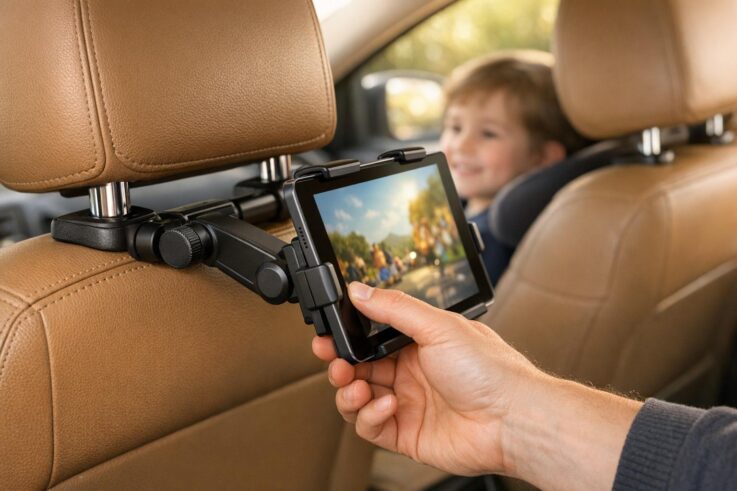
A seatback tablet holder can transform long car rides by providing hands-free entertainment for passengers. These devices securely attach to your vehicle’s headrest, holding a tablet or smartphone at eye level for a comfortable viewing experience. They reduce neck strain, prevent accidental drops, and keep passengers – especially kids – engaged during trips. Here’s what you need to know before buying one:
Tablet Compatibility: Ensure the holder fits your device, including its case. Most support tablets ranging from 7 to 12.9 inches, with some accommodating smaller or larger sizes.
Headrest Fit: Check your car’s headrest dimensions and mounting system (clamps or straps) to ensure compatibility.
Viewing Adjustability: Look for 360° rotation, tilt adjustments, and stability features to reduce glare and keep the screen steady on bumpy roads.
Durability: Opt for materials like ABS plastic or aluminum for long-lasting performance. Rubber or silicone grips help prevent device damage and slippage.
Ease of Installation: Tool-free setups, like spring-loaded clamps, save time and make switching between vehicles simple.
Cable Management: Integrated clips or USB hubs keep wires organized and accessible.
Price Ranges:
Budget ($15–$30): Basic options for occasional use, often made of plastic.
Mid-Range ($30–$60): More durable materials and added features like locking joints.
Premium ($60+): Advanced materials, extended arms, and features like wireless charging or anti-theft mechanisms.
For frequent travelers, professional installation of rear entertainment systems offers integrated power, audio, and multi-screen setups for a seamless experience. Whether you choose a simple holder or a custom system, the right choice enhances comfort and convenience on the road.
The BEST Car Tablet Holder for Kids! 🎮 Tryone Headrest Mount Review
sbb-itb-74b4b25
What to Consider When Buying a Seatback Tablet Holder
Choosing the right seatback tablet holder can make a big difference in how well it fits your devices, works with your car, and provides a comfortable viewing experience for everyone in the backseat.
When shopping, focus on three main factors: tablet compatibility, headrest fit, and viewing flexibility. These aspects determine how effectively the holder will function during your trips.
Tablet Compatibility
Start by checking the dimensions of your tablet, including its case. While screen sizes are measured diagonally, you’ll need to know the actual height, width, and thickness of your device with the case on. A snug case can add bulk, which might make it harder to fit into holders with tighter grips.
Most holders are designed to fit tablets ranging from 7 to 12.9 inches, though some models can accommodate smaller devices (as small as 4.5 inches) or larger ones (up to 18.4 inches). Pay attention to the maximum thickness the holder can handle – many are limited to 0.8 inches or less. For convenience, look for holders with adjustable legs or cutouts that leave charging ports and volume buttons accessible while the tablet is mounted.
Once you’ve confirmed your tablet will fit, the next step is to ensure the holder is compatible with your car’s headrest.
Vehicle Headrest Compatibility
Make sure your vehicle’s headrest design matches the holder’s mounting system. Measure the diameter of the headrest posts (typically 0.31–0.63 inches) and the distance between them (usually 4.7–5.9 inches for standard mounts). Some holders use tool-free, spring-loaded tension rods for quick setup, while others rely on screw-tightened clamps for a more secure fit.
If your car has fixed or integrated headrests without adjustable metal posts – common in certain Volvo models – you’ll need a holder that attaches with straps instead of clamps. For added protection, look for mounts with rubber or silicone padding on the clamps to prevent scratches and reduce the risk of slipping.
After confirming headrest compatibility, think about how adjustable the viewing angles are.
Adjustable Viewing Angles
A holder with 360-degree rotation and tilt adjustment makes it easy to switch between landscape and portrait modes. Ball-and-socket joints allow smooth angle adjustments and help reduce glare from sunlight or interior lights. This flexibility is especially useful if passengers of different heights – like a child and an adult – will be using the holder.
For extra stability, some premium models include locking mechanisms or tightening knobs to keep the tablet steady on bumpy roads. You might also find holders with extendable arms that position the tablet between the two front seats, making it easier for multiple backseat passengers to watch together.
Material Durability and Build Quality
A seatback tablet holder needs to handle constant vibrations, shifts in temperature, and the weight of your device without breaking down. Inferior materials can crack or warp in extreme conditions, while flimsy joints might let your tablet droop – or worse, fall – during sharp turns. The key to durability lies in solid clamps and sturdy materials.
Clamp and Grip Security
The clamps and grips are your first defense against bumpy rides. Look for grips lined with rubber or silicone. These materials not only create friction to stop slipping but also protect your tablet from scratches. Heavy-duty tightening knobs or strong spring-loaded brackets are essential for locking the mount securely onto the headrest posts, ensuring it won’t slide out of place during sudden stops. Some high-quality holders even come with shock-absorbing arms or rubberized joints to minimize vibrations, keeping your screen steady on rough roads.
For instance, the Arkon Slim-Grip® Tablet Headrest Mount is widely praised for its sturdy design and ability to reduce vibrations effectively. Without features like these, excessive screen shaking can make it hard to watch your tablet and might even harm its internal components over time.
High-Quality Materials
The best tablet holders are built with materials like impact-resistant ABS plastic, durable aluminum for the mounting arms, and reinforced silicone linings. Aluminum joints are especially useful for preventing sagging when holding heavier tablets, while ABS plastic resists daily wear and tear without cracking.
"Durability is a critical factor, especially for long-term use. Look for mounts made from high-quality materials such as ABS plastic, aluminum, or reinforced silicone." – Lenovo
Some premium models go a step further, using reinforced nylon or specialized polymers that can endure temperatures ranging from -10°C to 60°C (14°F to 140°F). On the other hand, avoid holders made from thin polycarbonate, as they often fail under the weight of larger tablets. Always check the weight capacity listed by the manufacturer – most standard mounts support devices weighing between 2.2 and 3.3 lbs.
Installation and Ease of Use
Nothing ruins a travel accessory faster than a frustrating setup. A quick and simple installation process can make a world of difference, enhancing both convenience and safety. The best seatback tablet holders are built to be installed in seconds – no tools, no hassle. With tool-free installation, you can easily switch the mount between vehicles or remove it for storage, making it perfect for families who share cars or travel often.
Tool-Free Installation
Modern tablet holders rely on spring-loaded brackets or adjustable clamps that require just a little manual effort to secure. Take the Lamicall holder, for instance – it installs in just 5–6 seconds, while the Najiaxiaowu model takes under a minute. This speed is thanks to user-friendly designs like thumb screws or spring mechanisms, which replace the need for traditional tools.
Once the base is attached, you can adjust the viewing angle using ball-and-socket joints or jointed arms with tightening knobs. These knobs are essential for keeping the tablet firmly in place, even on rough roads. Before making a purchase, double-check that the mount matches your vehicle’s headrest post spacing, which typically falls between 2.8 and 5.9 inches.
After securing the mount, the next step is managing cables to keep the setup neat and functional.
Cable Management Features
Loose, dangling cables can quickly become a headache – especially with kids in the backseat. Integrated cable management systems are a smart solution, keeping wires tidy and preventing them from being accidentally yanked out during use. High-quality mounts often include clips or cutouts that guide cables along the frame, ensuring charging ports and headphone jacks stay accessible without creating a tangled mess.
Some advanced models even come with built-in USB hubs capable of charging up to four devices at once. This feature is a lifesaver on long trips, allowing multiple passengers to keep their tablets or phones powered up. These small but thoughtful features turn a simple tablet holder into a full-fledged entertainment system for backseat travelers.
Price Ranges and What to Expect
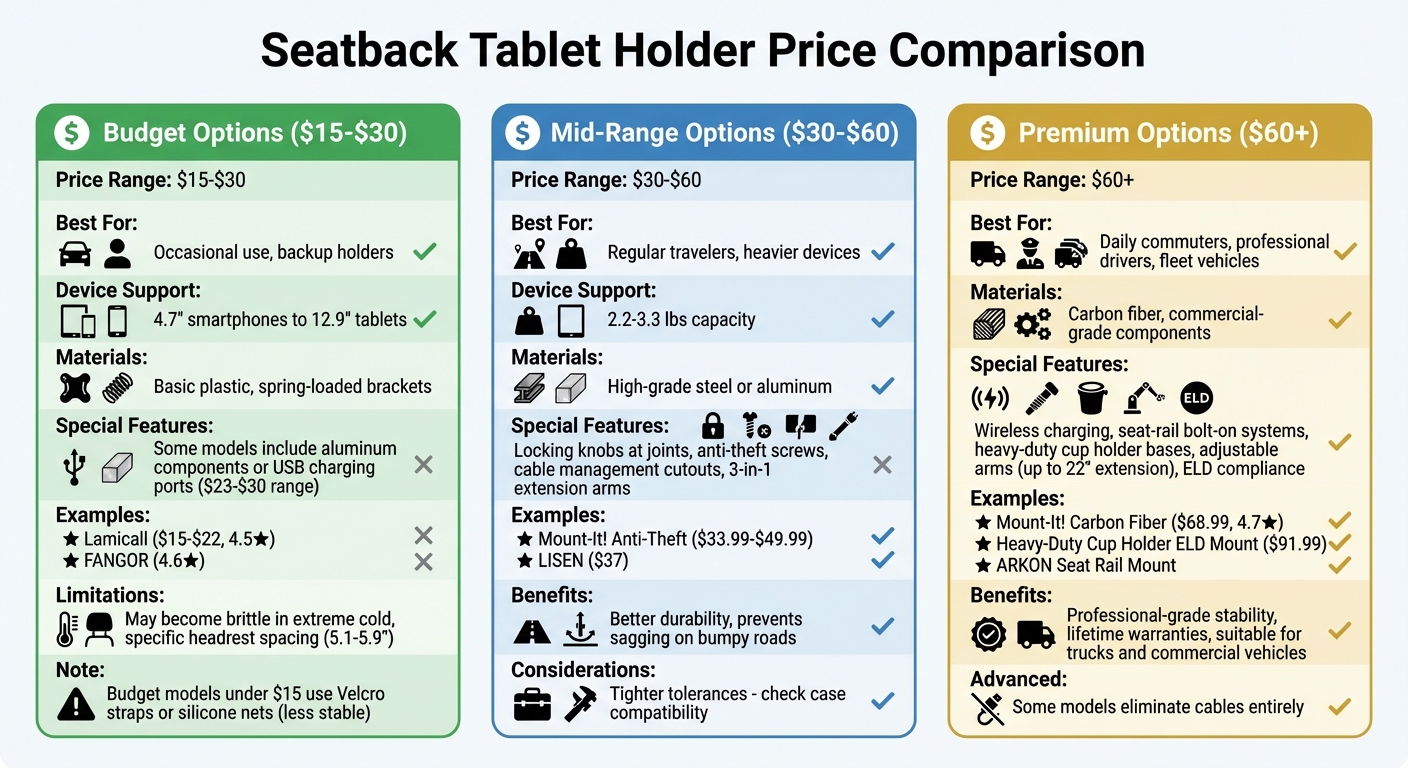
Seatback Tablet Holder Price Comparison Guide: Budget vs Mid-Range vs Premium Features
Seatback tablet holders come in a variety of price points, each offering different features and levels of durability. Choosing the right one depends on how often you plan to use it and how much stability you need during your travels.
Budget Options ($15–$30)
If you’re looking for something affordable, budget models are perfect for occasional trips or as a backup. These mounts typically support devices ranging from 4.7-inch smartphones to 12.9-inch tablets. For example, the Lamicall Car Headrest Tablet Holder, priced between $15 and $22, has an impressive 4.5-star rating from over 9,800 Amazon reviews. Similarly, the FANGOR Car Headrest Mount Holder boasts a 4.6-star rating from a comparable number of users.
In this price range, most mounts use spring-loaded brackets to securely clip between headrest posts. Cheaper options, priced around $9–$15, often rely on Velcro straps or silicone nets, which may not offer the same level of stability. On the higher end of the budget spectrum ($23–$30), models like the Aomiker or APPS2Car holders include features like aluminum components or integrated USB charging ports. However, keep in mind that plastic-bodied mounts in this range may become brittle in extreme cold and are typically designed for specific headrest spacings, usually between 5.1 and 5.9 inches.
Mid-Range Options ($30–$60)
Mid-range mounts step up in quality, offering better materials and more stability. Instead of basic plastic, you’ll find models incorporating high-grade steel or aluminum, which ensures better durability over time. A standout feature in this category is the addition of locking knobs at joints, which prevent your tablet from sagging or shifting on bumpy roads.
These mounts are designed to handle heavier devices, often supporting weights of 2.2–3.3 lbs. Many also include anti-theft features, such as tamper-proof screws, making them suitable for semi-public settings. For instance, the Mount-It! Anti-Theft Wall/VESA Mount ($33.99–$49.99) offers VESA compatibility and cable management cutouts – features that budget options typically lack. Another example is the LISEN mount, priced around $37, which includes refined steel rods and 3-in-1 extension arms, making it ideal for SUVs where passengers need flexible positioning. However, be aware that some mid-range models have tighter tolerances, so double-check your tablet’s case compatibility before purchasing.
Premium Options ($60+)
Premium tablet mounts deliver top-notch stability and versatility, making them ideal for those who need professional-grade performance. These models justify their higher price tags with advanced materials and specialized features. For example, the Mount-It! Carbon Fiber Universal Tablet Headrest Mount ($68.99) uses durable carbon fiber instead of plastic and holds a 4.7-star rating from 20 reviews. Commercial drivers might prefer models like the Heavy-Duty Cup Holder Tablet ELD Mount ($91.99), which complies with electronic logging device (ELD) requirements for fleet vehicles.
High-end mounts often go beyond headrest clamps, offering seat-rail bolt-on systems or heavy-duty cup holder bases with adjustable arms that extend up to 22 inches. The ARKON Mounts Car Seat Rail Tablet Mount, for instance, received praise from 1,462 buyers in a single week in February 2026 for its secure fit in trucks. Some premium models even feature wireless charging, eliminating the need for cables altogether. Many also come with lifetime warranties that cover defects in materials or workmanship, making them a reliable choice for daily commuters or professional drivers who can’t afford downtime.
Professional Installation for Rear Entertainment Systems
DIY seatback tablet holders can be a great option for occasional use, but professionally installed systems take things to the next level with better integration and advanced features. Companies like Auto Sound & Security specialize in installing high-quality dual 10.1-inch seat-back systems that go far beyond basic clamp-on mounts. These Android-powered setups come packed with features like touch screen controls, Wi-Fi, and 16GB of built-in memory, allowing for offline downloads. They also include HDMI inputs for game consoles or streaming devices and support SD/USB media playback. What really sets these systems apart is the seamless audio integration – they connect directly to your car’s factory sound system using a 100-channel FM modulator. This means passengers can enjoy audio through wireless headphones or car speakers without the mess of dangling cables.
Another key benefit of professional installation is the clean and efficient power setup. Instead of relying on cigarette lighter adapters or portable batteries, installers hardwire charging ports behind the seat panels. This approach not only eliminates clutter but also ensures consistent power. For vehicles with start/stop fuel-saving systems, these setups include voltage stabilizers to keep the screens running smoothly even when the engine restarts. Additionally, the VOXXLINK app allows you to remotely control and monitor the system from your smartphone, adding convenience to the mix.
Professionally installed systems also offer a more stable, permanent mounting solution. By bolting mounts to seat rails or directly to the vehicle floor, these setups minimize vibrations, delivering a viewing experience that rivals factory-installed systems. As Auto Trim Restyling explains:
"To install the perfect rear entertainment system in your vehicle, expert assistance is essential… ensuring a seamless and enjoyable entertainment experience for your passengers".
For families who rely on tablets daily or frequently take long trips, professional installation is a smart choice. Auto Sound & Security, an authorized dealer for brands like Pioneer, Kenwood, JVC, and Alpine, can integrate rear entertainment systems with your vehicle’s broader technology setup, including navigation displays. Whether you’re planning a multi-screen configuration or need dual-zone playback so passengers can watch different content, expert installation ensures the wiring and signal distribution are handled correctly – something DIY solutions just can’t match.
Conclusion
Start by measuring your tablet (with its case, if applicable) and checking the spacing between your vehicle’s headrest posts – most fall between 2.8 and 6.3 inches. This ensures the holder you choose will fit securely. Look for features like 360° rotation and tilt adjustments to minimize glare and reduce neck strain during use. Materials like aluminum and reinforced ABS plastic are great choices for durability, especially when dealing with vibrations and temperature changes.
Tablet holders come in a wide price range, from $10 to over $60. If you’re only using it occasionally, a budget option might suffice. However, for rough roads or more permanent setups, consider mid-range or premium models that offer better stability and easier, tool-free installation.
For those who frequently need rear-seat entertainment, professional installation can take your setup to the next level. Companies like Auto Sound & Security specialize in integrated systems with hardwired power, seamless audio, and multi-screen configurations. As authorized dealers for brands like Pioneer, Kenwood, JVC, and Alpine, they can create a system that blends perfectly with your vehicle’s existing technology.
Whether you go for a simple clamp-on holder or a custom-installed entertainment system, the right choice can turn long car rides into enjoyable, engaging experiences for your passengers.
FAQs
Will it fit my tablet with a case on?
When figuring out if your tablet with a case will fit in a holder, it all comes down to the holder’s size and adjustability. Many holders are built with adjustable clamps or padding to handle tablets with cases. Just make sure to check the holder’s maximum supported dimensions and compare those to your tablet’s size, including the case. This way, you’ll know if it’ll fit securely.
Will it work with my car’s headrest type?
Whether a seatback tablet holder will work with your car’s headrest comes down to the mount’s design and how it matches your headrest bars’ width and style. Most holders are built for standard headrests, which are usually spaced 4.9 to 5.9 inches apart. Some models, however, use adjustable straps, making them more adaptable to different setups. To avoid any issues, measure the distance between your headrest bars and check it against the holder’s specifications before making a purchase.
How do I stop the screen from shaking on bumpy roads?
To keep your screen steady on bumpy roads, look for a mount with anti-vibration features such as silicone gaskets, spring-loaded arms, gel pads, or mechanical isolators. These components help absorb shocks, reducing screen movement. If you’re riding on rough terrain or uneven surfaces, a mount with shock absorption technology is especially helpful for maintaining a stable and readable screen throughout your journey.
To schedule an appointment with your friendly neighborhood experts at Car Repair Services, give us a call at +1 718-470-2223 or fill out the form below with your information and requested services. One of our team members will get back to you as soon as possible to confirm your appointment.
mailing list to receive updates on new arrivals, offers and other discount information.
We use cookies to ensure that we give you the best experience on our website. If you continue to use this site we will assume that you are happy with it.Ok