CarPlay vs Android Auto: Which Is Better for Your Car?
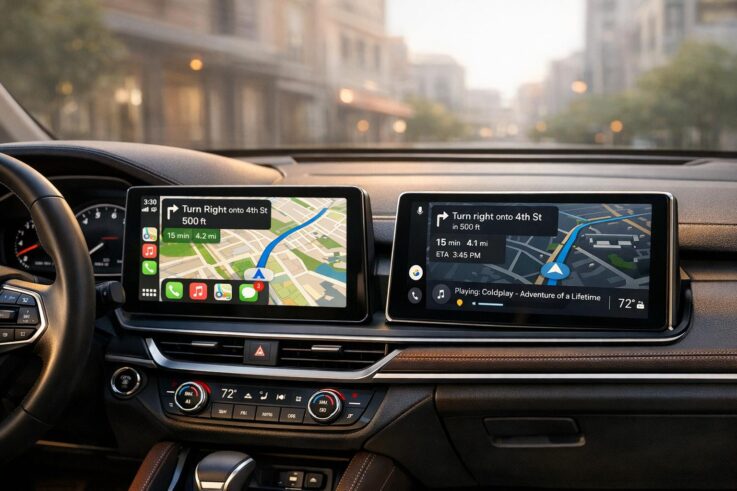
Apple CarPlay and Android Auto let you use your favorite smartphone apps – like maps, music, and messaging – on your car’s display. Both aim to reduce distractions with simple interfaces and voice commands, but they differ in compatibility, features, and user preferences.
Key Takeaways:
CarPlay is best for iPhone users who value simplicity and tight integration with Apple apps like iMessage and Apple Music.
Android Auto offers more customization, better third-party app support, and advanced navigation with Google Maps.
Both systems are widely available in new cars, with aftermarket options for older vehicles.
Wired connections are more stable, while wireless setups add convenience but may drain your phone’s battery faster.
Your choice depends on your smartphone and the features you prioritize. If your car doesn’t support either system, aftermarket head units can bring these features to your vehicle, starting at around $200. Wired setups are more reliable, but wireless options are increasingly common in newer models.
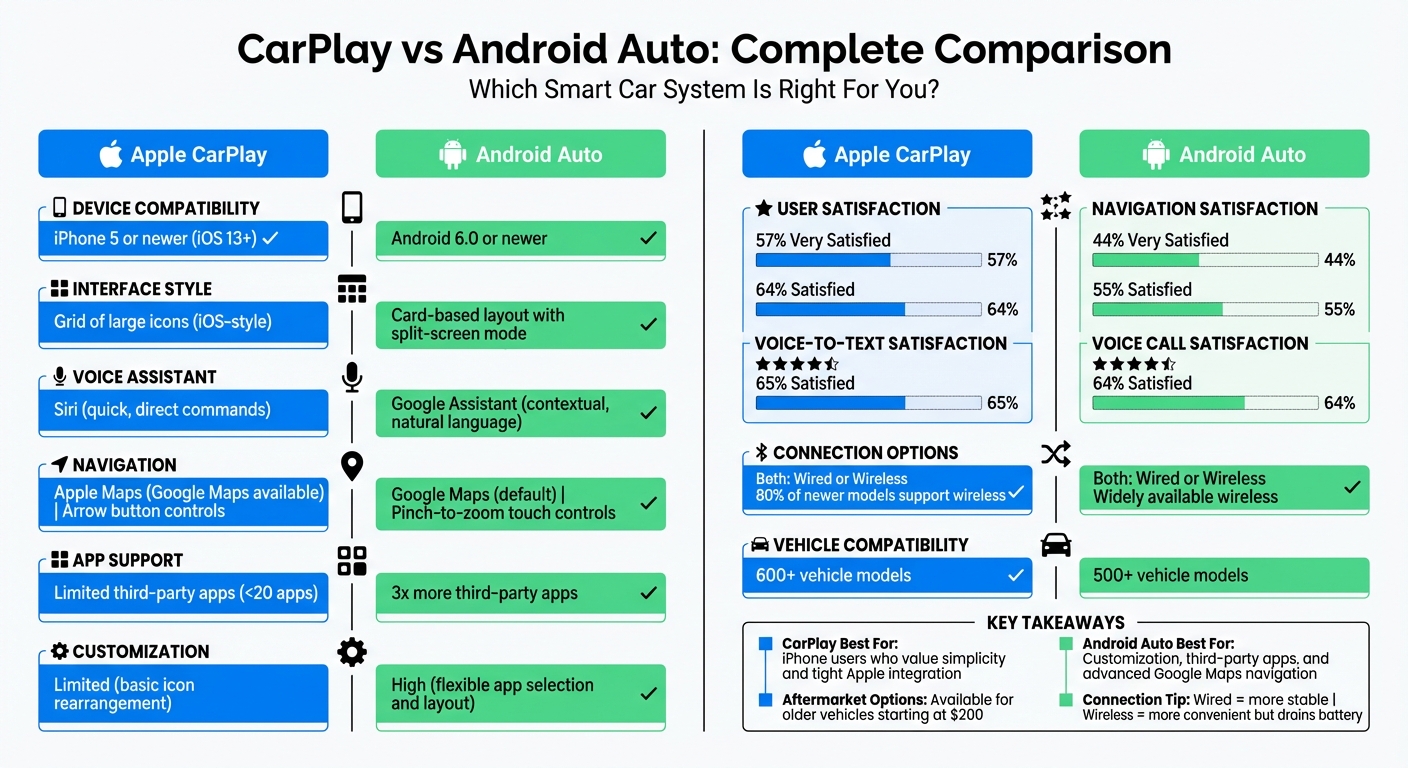
Apple CarPlay vs Android Auto Feature Comparison Chart
When it comes to system requirements, both platforms are tailored to their respective ecosystems. Apple CarPlay works with iPhone 5 and newer models running iOS 13 or later. It also requires an active data plan, along with Siri, WiFi, and Bluetooth enabled. Meanwhile, Android Auto is compatible with devices running Android 6.0 or later. For Android 10 and newer, it’s built directly into the system, but older versions require downloading a separate app.
The ecosystems themselves highlight another key distinction. CarPlay mirrors the iPhone experience, emphasizing native Apple services like iMessage and Apple Music. In contrast, Android Auto integrates seamlessly with Google Assistant and supports a wider variety of third-party messaging apps. That said, compatibility can also depend on the car’s hardware. For instance, BMW vehicles need iDrive 5.0 or newer and built-in navigation to support CarPlay.
User Interface Design
CarPlay’s interface is designed to feel like a natural extension of the iPhone. It features a flat grid of large, colorful icons, making it easy to navigate. Ron Amadeo, Reviews Editor at Ars Technica, explains it well:
"CarPlay is basically the iOS smartphone/tablet interface enlarged 400 percent and simplified for car usage… The icons are the star of the show here – they’re big, bright, obvious, and easy to hit."
Most tasks are accessible within one or two taps, avoiding complicated submenus. Its "Dashboard" view combines navigation, media controls, and Siri suggestions into a single screen.
Android Auto, on the other hand, uses a card-based design reminiscent of Google Now. A persistent bottom taskbar allows quick switching between navigation, communication, and music. Users can also customize which apps appear and in what order. Its split-screen mode is another standout feature, enabling simultaneous use of apps like maps and music. Plus, direct touch gestures like scrolling and pinch-to-zoom make map interactions smoother.
According to a Consumer Reports survey, 57% of respondents were "very satisfied" with CarPlay’s interface, compared to 44% for Android Auto. Toyota drivers, for example, reported a 12% satisfaction boost when switching from their factory Entune system to CarPlay.
Voice Assistant Integration
When it comes to voice assistants, Google Assistant on Android Auto tends to excel in handling natural language queries, follow-up questions, and contextual searches – whether you’re looking for business hours or nearby restaurants. It also performs well in noisy environments and with varied accents.
Siri on CarPlay is particularly good at executing straightforward commands like "Call Dad" or "Play Beyoncé", while maintaining tight integration with native apps like Messages, Apple Music, and Calendar. A 2020 Consumer Reports survey found 65% of users were satisfied with CarPlay’s voice-to-text functionality, compared to 55% for Android Auto. For voice calls, CarPlay also edged out Android Auto with a 70% satisfaction rate versus 64%.
Comparison Table
Here’s a quick summary of the key differences:
Feature
Apple CarPlay
Android Auto
Device Requirement
iPhone 5 or newer (iOS 13+ recommended)
Smartphone running Android 6.0 or later
Interface Style
Grid of large icons (iOS-style)
Card-based layout with a persistent taskbar
Customization
Limited (basic icon rearrangement)
High (flexible app selection and layout)
Voice Assistant
Siri (quick, direct commands)
Google Assistant (contextual, natural language)
Map Interaction
On-screen arrow buttons
Direct touch (scroll and pinch-to-zoom)
Learning Curve
Minimal for iPhone users
Minimal for Android users
Compatibility with Cars, Head Units, and Hardware
Factory Support in U.S. Vehicles
Most major U.S. car brands – like Acura, Audi, BMW, Chevrolet, Ford, Honda, Hyundai, Kia, Mercedes-Benz, Nissan, Subaru, Toyota, and Volkswagen – offer support for both CarPlay and Android Auto, either as standard or optional features. By 2022, over 600 vehicle models supported CarPlay, while more than 500 models were compatible with Android Auto.
However, Tesla and Rivian stand out as exceptions. Instead of integrating these platforms, they rely on their own proprietary infotainment systems. Initially, some manufacturers, such as BMW and Ferrari, exclusively supported CarPlay. Over time, most of them, including Ferrari, have added Android Auto compatibility. Mazda also took a unique approach by offering dealer-installed upgrades for models from 2014 onward, enabling CarPlay functionality.
For vehicles without factory support, aftermarket upgrades and connection options provide practical alternatives to bridge the gap.
Aftermarket Head Unit Options
If your car doesn’t come with built-in compatibility, aftermarket head units are an excellent way to upgrade. Popular brands like Pioneer, Kenwood, JVC, Alpine, and Sony offer a range of options. Auto Sound & Security, for instance, is an authorized dealer for Pioneer, Kenwood, JVC, and Alpine and provides professional installation services.
These aftermarket units cater to various needs, with display sizes ranging from 9 to 11 inches and prices starting at $200, going up to over $1,600 for premium models. For older cars with limited dashboard space, floating screen designs are a practical solution.
When choosing an aftermarket head unit, it’s important to check for iDatalink Maestro compatibility, especially if your vehicle has features like steering wheel controls or integrated climate settings. This ensures that factory-installed features remain functional after the upgrade. With these options, even older vehicles can enjoy modern connectivity without losing core functionalities.
Connection Types: Wired vs Wireless
How you connect your device to the head unit significantly affects the overall user experience.
Wired connections rely on a USB cable to link your phone to the head unit. This setup provides a stable connection and charges your phone while driving, making it ideal for long trips or areas with unreliable cellular coverage. Jake Fisher, Senior Director of Auto Testing at Consumer Reports, highlights the reliability of wired setups:
"Although it’s convenient to use WiFi and leave your phone in your pocket, it’s not as certain as a wired connection".
Wireless connections, on the other hand, require a head unit with both Bluetooth and Wi-Fi capabilities. Bluetooth initiates the pairing process, while Wi-Fi handles data transfer. Wireless CarPlay is now supported by over 20 automakers, and roughly 80% of newer car models include this feature. However, wireless connectivity can drain your phone’s battery faster. Using a Qi wireless charging pad can help offset this issue. For vehicles limited to wired connections, third-party adapters like those from Magic Link or Aluratek can add wireless functionality. Aluratek adapters, in particular, boast about 90% compatibility with factory wiring for CarPlay.
Comparison Table
Feature
Factory Systems
Aftermarket Head Units
Wired Connection
Wireless Connection
Availability
Over 600 models for CarPlay; 500+ for Android Auto
Fits most vehicles universally
Standard
Requires specific hardware
Cost
Typically included with the vehicle
$200–$1,600+ depending on features
Inexpensive cabling
May require an adapter
Installation
Pre-installed
Professional installation recommended
Plug and play
Requires Bluetooth/Wi-Fi pairing
Stability
High
High (if installed properly)
Most reliable
Can be less consistent
Battery Impact
N/A
N/A
Charges the phone
Drains battery faster
Features, Apps, and Daily Driving Experience
Navigation Options
When it comes to navigation, Android Auto’s Google Maps stands out with its precise routing and extensive points of interest. Doug Newcomb from PCMag puts it succinctly:
"Google Maps can’t be beat for navigation. And Android Auto offers more apps, with more voice search capabilities across those apps than CarPlay."
Android Auto makes navigating easier with intuitive map controls like pinch-to-zoom and tap-to-adjust routes. CarPlay, on the other hand, relies on arrow buttons to pan the map and navigate menus, which can feel clunky – especially in high-traffic areas where quick adjustments are key.
Google Assistant also excels in casual voice commands, making it easier to locate gas stations, restaurants, or charging points. However, iPhone users can bypass Apple Maps by adding Google Maps to their CarPlay dashboard, blending the best of both systems. Interestingly, a survey of over 73,000 respondents revealed that 64% of CarPlay users were happy with its navigation, compared to 55% for Android Auto.
Beyond navigation, both platforms integrate well with media and communication apps, enhancing the overall driving experience.
Media and Entertainment Apps
For media lovers, Android Auto has a clear edge with support for three times more third-party apps than CarPlay. This makes it a go-to choice for users who rely on niche streaming platforms or podcast services. That said, both systems include popular apps like Spotify, Apple Music, and Audible.
CarPlay takes the lead in music library browsing, offering detailed options to sort by artist, album, or song. Android Auto, by contrast, limits browsing to playlists and queues to reduce distractions.
In terms of satisfaction, 57% of drivers reported being "very satisfied" with CarPlay, compared to 44% for Android Auto and 50% for factory systems. As Kelly Funkhouser from Consumer Reports notes:
"Being able to use familiar apps that are optimized can save drivers from distraction."
These media capabilities pair seamlessly with messaging tools to keep drivers connected without compromising safety.
Messaging and Communication
Messaging is another area where Android Auto shines, thanks to Google Assistant’s advanced handling of third-party apps like WhatsApp, Skype, Telegram, and Hangouts. In early 2024, Android Auto introduced generative AI features to summarize lengthy text threads and suggest replies, making it even easier to stay focused on the road.
CarPlay, however, leans heavily on Apple’s native Messages app, with tight iMessage integration. While it does support some third-party notifications, its ecosystem is more limited. Research from the AAA Foundation for Traffic Safety indicates that CarPlay generates lower cognitive demand when sending texts compared to Android Auto.
Doug Newcomb of PCMag highlights the importance of voice recognition for messaging:
"Messaging is another feature that benefits from voice recognition, and far surpasses similar hands-free texting features offered by automakers in its ease and accuracy."
Comparison Table
Feature
CarPlay
Android Auto
Default Navigation
Apple Maps
Google Maps
Map Interaction
Arrow buttons for panning
Pinch-to-zoom and tap alternatives
Voice Assistant
Siri
Google Assistant
Navigation Satisfaction
64%
55%
Third-Party App Support
Limited/curated selection
Over three times as many apps
Music Library Browsing
Full browsing by artist, album, song
Limited to playlists and queues
Voice-to-Text Satisfaction
65%
55%
Voice Call Satisfaction
70%
64%
AI Text Summarization
Not available
Available (since early 2024)
Messaging App Support
iMessage and limited third-party apps
Supports WhatsApp, Skype, Telegram, Hangouts
sbb-itb-74b4b25
Safety, Ease of Use, and Choosing the Right System
Safety Features and Hands-Free Performance
CarPlay and Android Auto are designed to keep drivers focused on the road by simplifying interfaces and disabling certain features – like onscreen keyboards – when the car is moving. Both systems rely heavily on voice commands through Siri or Google Assistant, making it easier to handle calls, send texts, or navigate without taking your hands off the wheel.
Studies show that these systems create a "moderate" level of cognitive demand, which is significantly less than the "very high" demand often imposed by factory-installed infotainment systems. Kelly Funkhouser of Consumer Reports highlights the importance of minimizing distractions:
"What’s most important is that drivers can use the system quickly without taking their eyes off the road."
When it comes to specific tasks, CarPlay tends to make texting easier, while Android Auto excels in navigation setup. Both systems feature smartphone-style interfaces, making them far simpler to use than many built-in car systems.
Stability and Reliability
CarPlay delivers a consistent experience across different vehicles, thanks to its reliance on your iPhone’s processor. This ensures smooth performance that matches the reliability of your phone. On the other hand, Android Auto offers greater flexibility with customizable layouts and split-screen options. However, its performance can vary depending on your phone’s hardware and the vehicle’s onboard system – vehicles with less capable hardware may experience slower or less reliable performance. For the best results, a wired connection is recommended to maintain stability and reduce battery drain.
How to Choose the Right System
Based on these safety and performance insights, your choice will depend on your priorities. If you want a system that’s easy to set up and excels in messaging and calls, CarPlay is a solid option. If you prefer advanced navigation tools, multitasking capabilities, or a customizable dashboard, Android Auto might be the better fit.
For vehicles that don’t natively support these systems, Auto Sound & Security offers professional installation services for both CarPlay and Android Auto. They work with well-known brands like Pioneer, Kenwood, JVC, and Alpine to ensure a smooth integration tailored to your car’s model and your personal preferences.
To get the most out of your system, test it during a drive and keep your firmware updated regularly.
Deciding between Apple CarPlay and Android Auto largely depends on your smartphone and the features you value most. Apple CarPlay delivers a smooth, user-friendly experience that mirrors the design of an iPhone. It also prioritizes privacy with on-device processing and boasts high user satisfaction. However, it supports fewer than 20 third-party apps, and Siri may falter when handling more complex voice commands. On the other hand, Android Auto shines with its customizable split-screen layouts, access to a wide range of third-party apps, and Google Assistant’s reliable voice recognition. But keep in mind, its performance can vary depending on your vehicle’s hardware, and the wireless mode has a reputation for draining the battery quickly – up to 1% per minute.
In most cases, the best option aligns with your smartphone. Switching brands solely for car integration is rarely necessary.
If you’re driving an older vehicle, upgrading to a modern system is both feasible and affordable. Aftermarket head units, starting at around $399, can bring CarPlay or Android Auto to your car. Companies like Auto Sound & Security offer professional installation services that seamlessly integrate steering wheel controls, factory cameras, and climate systems. This ensures your car retains its original functionality while gaining cutting-edge features.
For the best experience, stick with a wired connection to maintain stability and minimize battery drain. Keeping your phone’s operating system updated, testing voice commands while driving, and simplifying notifications can also enhance your time on the road. Whether you prefer CarPlay’s straightforward design or Android Auto’s versatility, a professional setup can help you get the most out of your system – maximizing both safety and convenience on every trip.
FAQs
Should I use a wired or wireless connection for CarPlay or Android Auto?
Deciding between a wired or wireless connection for CarPlay or Android Auto comes down to your car’s setup, your phone’s compatibility, and what matters most to you. If your car or head unit supports wireless connections and you have a compatible phone (like an iPhone XS or newer running iOS 13+, or an Android device with Android 10+), wireless offers the convenience of a cable-free setup and automatic reconnection. That said, you might experience occasional signal interruptions, especially in busy areas or if your phone’s battery is running low.
Wired connections, meanwhile, provide a steady and dependable link while also keeping your phone charged during your drive. This option works well if your car doesn’t support wireless or if you value consistent performance over convenience. If you’re thinking about switching to wireless, consider the extra costs for a new head unit or adapter and any installation work that might be needed. Ultimately, the right choice depends on whether you prioritize ease of use or reliability.
Can I add CarPlay or Android Auto to an older car that doesn’t have built-in support?
If your car didn’t originally come equipped with CarPlay or Android Auto, don’t worry – you can still enjoy these features by installing an aftermarket stereo or adapter that supports them. Many third-party options are designed to fit a variety of vehicles, making it possible to add this modern functionality to older models.
This upgrade can transform your driving experience, giving you easy access to navigation, streaming music, and hands-free calls – all through an updated, user-friendly interface. Just make sure the stereo or adapter you choose is compatible with your car before making a purchase.
How do the voice assistants in CarPlay and Android Auto differ?
CarPlay leans on Siri, while Android Auto taps into Google Assistant, and these choices reflect the unique strengths of their ecosystems. Siri focuses on straightforward, iPhone-specific tasks like sending a text, setting a reminder, or making a call – all accomplished with simple voice commands. It’s tightly integrated with Apple’s apps, operating just as it does on your iPhone.
Google Assistant, by contrast, offers a more conversational style and handles more complex tasks with ease. It’s great for answering broader questions, performing web searches, or managing multi-step actions. Plus, its integration with Google’s apps like Maps and Calendar allows for richer, more detailed responses and functionality.
If you’re looking for simple, Apple-centered functionality, Siri is your go-to. For more dynamic, information-heavy tasks, Google Assistant takes the lead.
To schedule an appointment with your friendly neighborhood experts at Car Repair Services, give us a call at +1 718-470-2223 or fill out the form below with your information and requested services. One of our team members will get back to you as soon as possible to confirm your appointment.
mailing list to receive updates on new arrivals, offers and other discount information.
We use cookies to ensure that we give you the best experience on our website. If you continue to use this site we will assume that you are happy with it.Ok